
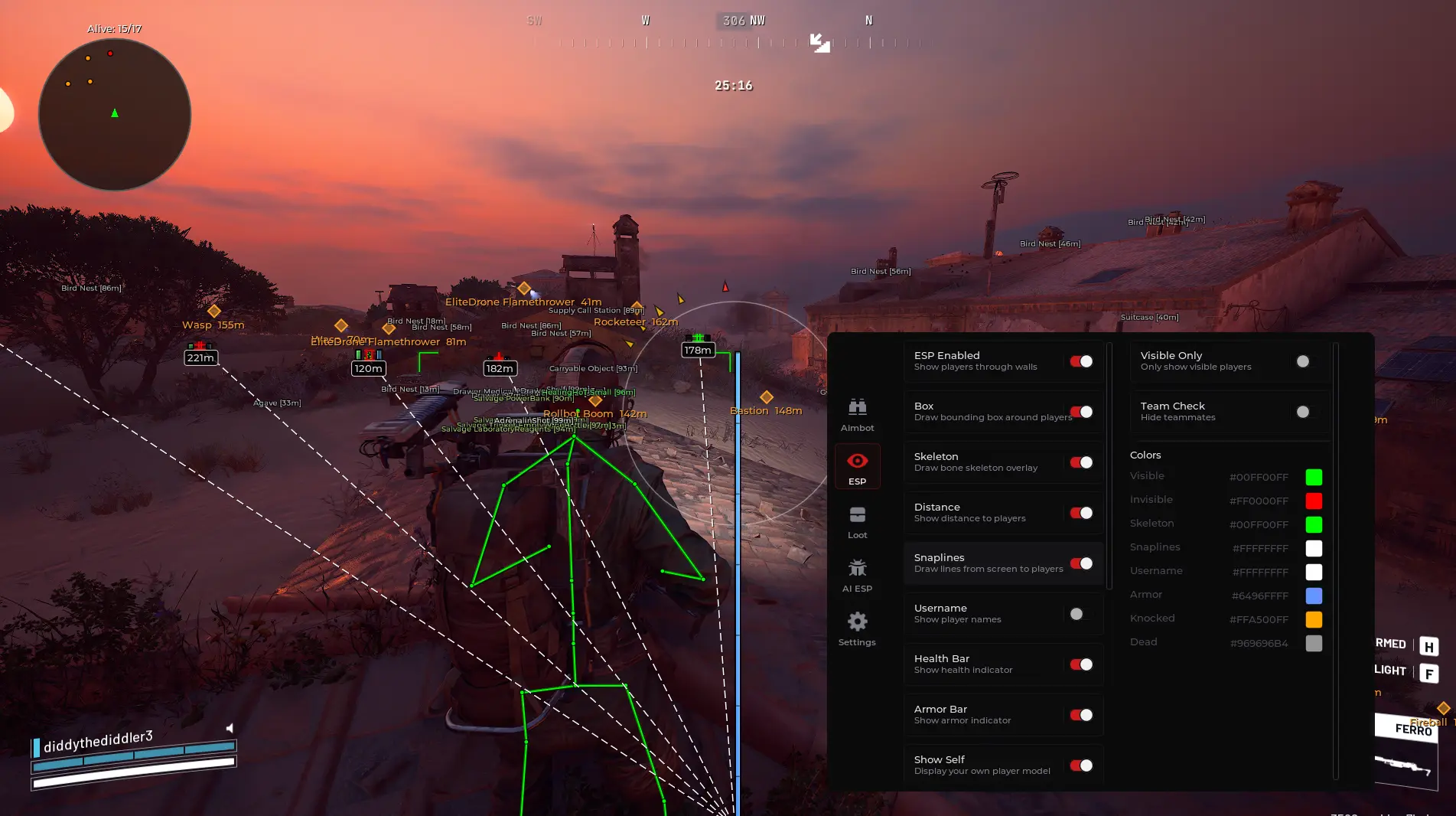

This external enhancement tool for Yami ARC Raiders is designed to provide players with greater accuracy, awareness, and control through a comprehensive suite of visual and targeting features. The advanced ESP and visuals system delivers critical battlefield information with customizable name, box, skeleton, squad, and distance indicators, featuring separate color options for visible and invisible enemies to ensure clarity in any situation. The integrated aimbot system offers smooth and precise aim assistance with adjustable FOV radius, multiple aim types including Mouse and Memory, target locking, visibility checks, prediction support, and customizable bone selection. Players maintain complete control over smoothness, hotkeys, distance limits, and targeting behavior, allowing for personalized performance that matches individual playstyles. A built-in 360° radar provides full positional awareness with adjustable scale and maximum distance settings, complemented by optional off-screen arrows for continuous battlefield awareness from any angle.
The extensive World ESP system enables full customization for tracking crates, drones, dropped items, corpses, salvage, carryables, and supply stations, with individual category configuration including draw dot options, name display, color selection, and distance limit controls. A dedicated Battle Mode feature with assignable hotkey allows players to quickly modify display elements during high-intensity scenarios, while all components are optimized for stability and minimal performance impact across both Windows 10 and Windows 11. The complete configuration system supports adding, loading, and sharing profile setups for easy switching between different playstyles or game modes. Operating externally and remaining undetected, the tool includes a built-in spoofer and powerful aimbot functionality designed to enhance privacy, safety, and accuracy during gameplay, ensuring consistent and responsive long-term performance.
Aimbot – Master toggle for the targeting assistance system
Visible Only – Only target enemies that are within line of sight
Team Check – Prevents targeting of teammates
Aim Keys – Configurable hotkeys to activate aiming assistance
Target Area – Select which part of the body to prioritize
Field of View (FOV) – Maximum angle radius for target acquisition
Aim Smoothing – Adjustable smoothness for natural aiming movement
Distance Aim – Prioritize targets based on proximity
Draw FOV Circle – Visual representation of your FOV radius on screen
FOV Color – Custom color selection for the FOV circle display
Humanization – Adds realistic aiming patterns to avoid detection
Movement Prediction – Accounts for target movement trajectory
ESP Enabled – Master toggle for all on-screen player information
Visible Only – Only display enemies within line of sight
Box – Draws bounding boxes around player models
Skeleton – Displays player bone structure for precise targeting
Distance – Shows real-time distance to each player
Snaplines – Lines drawn from screen center to player positions
Username – Displays player names above their character
Health Bar – Visual representation of remaining health
Armor Bar – Visual representation of remaining armor
Show Self – Display your own ESP elements
Visible Check – Color-coded indicators for visible vs. hidden enemies
Team Check – Filters out teammate displays
Custom Colors – Individual color selection for Visible, Invisible, Skeleton, Snaplines, Username, Armor, Knocked, and Dead states
Loot ESP – Master toggle for world item visualization
Lootable Only – Only display items that can be picked up
Show Pickups – Display individual item pickups in the world
Show Containers – Display loot containers and boxes
Show Cargo Drops – Display cargo drop locations
Max Distance – Maximum range for loot item visibility
Pickup Filters – Fine-tune which item types appear
Weapons – Toggle display of weapon pickups
Ammo – Toggle display of ammunition
Consumables – Toggle display of healing and utility items
Loot Colors – Custom color coding by item type and rarity
AI ESP – Master toggle for enemy AI visualization
Show Name – Display AI entity names
Show Distance – Show real-time distance to AI enemies
Show Destroyed – Indicate when AI units are eliminated
Max Distance – Maximum range for AI entity visibility
Colors – Custom color selection for AI display elements
Performance – Optimize tool performance based on system capabilities
Overlay FPS – Configure frames per second for the overlay rendering
Frame Time – Monitor and adjust frame timing for smoothness
Render FPS – Control rendering frequency for display elements
Crosshair – Enable custom on-screen aiming reticle
Crosshair Drawing – Customize crosshair appearance and style
Config Profiles – Complete profile management system
Save – Save current configuration to a profile
Load – Load previously saved configurations
Delete – Remove unwanted configuration profiles
Reset to Defaults – Restore factory default settings
Radar & HUD – Master controls for radar and heads-up display
Radar – Toggle the 360° positional awareness radar
Radar Size – Adjust the on-screen dimensions of the radar
Radar Range – Set the detection distance for radar display
FOV Compass – Directional compass showing current field of view
Edge Indicators – Screen-edge arrows pointing to off-screen targets
Spoofer Included – Built-in hardware/tpm spoofer for enhanced privacy
Native Controller Support – Full compatibility with game controllers
Streamproof On/Off – Toggle visibility of overlay during streaming
Supported Platform: Steam – Fully compatible with Steam version
Supported CPU: Intel & AMD – Works on all major processor architectures
Supported OS: Windows 10–11 – Full operating system compatibility up to 25h2


HyperForce provides the fastest and most reliable premium software for top games. With cutting-edge tools and unmatched support, we help gamers dominate every battle. Stay undetected, stay ahead, and play with confidence.
How can we help you?
Support runs entirely through our Discord ticket system — the card above opens our server so you can create a ticket. Please be patient for a reply; we help a lot of people every day.
Already purchased? Have your Order ID ready in your ticket — it helps us sort your case faster.